Accounts and Debts Application:
Works without the need for the Internet only. Your first login requires you to log in via the network
Easy to use
Secure (no one will see your data, it is saved on your phone only and is never shared)
Quickly responsive and dynamic
The application provides you with:
First: Record your debts and debts that you have or owe.
Second: Complete the aggregate accounts automatically.
Third: A set of reports that save you effort and time
Fourth: Share accounts via social networking sites.
Fifth: A search/sorting function that enables you to access easily and quickly.
Sixth: The export and import feature for the database.
Seventh: The possibility of automatically calculating amounts in dollars and local currency according to the exchange rate that you enter yourself
Eighth: Completely free, seize the opportunity
Ninth: The paid version works without ads
Instructions for use
Enter the name (if new) and phone number where you can communicate directly with customers according to this number via WhatsApp and a note indicating something that reminds you of the customer
or by choosing the name from the list that will appear after printing the first letter of the name.
You can also specify the date of the transaction by clicking on the date, which contains today's date as a default value.
After clicking on the Save button, the added record will appear where you can delete it later when closing the account with it by selecting and deleting it
Reports:
The account book contains a set of analytical reports that save you effort and time.
Search:
You can search for (the customer's name if you have many customers) or part of that. You can use the search feature to filter the data.
Transactions with each customer or merchant:
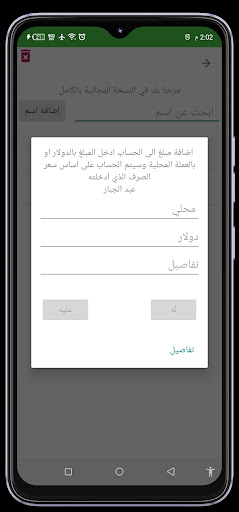
After clicking on any customer from the list, a dialogue appears asking you to add an amount received from the customer or paid to him or a details button to display all transactions with this customer in real time to add
In the activity of transactions with customers:
A detailed report can be sent to the customer directly (provided that his phone number is entered correctly). The report is an Excel file sent via WhatsApp to this person containing all transactions with this customer from the beginning of dealing with him
It also contains a report of another type that shows the final total of the account between you
Delete/merchant or customer:
Select a specific name by clicking on the box next to the name. The delete button appears for this customer with all his previous transactions easily.
Privacy and data security:
The application only asks you for the email and password, which are kept with us for statistical operations only and to adjust the application's progress well and are not shared with any other party
Database protection (backup):
It is very important to keep a backup copy of your data from time to time.
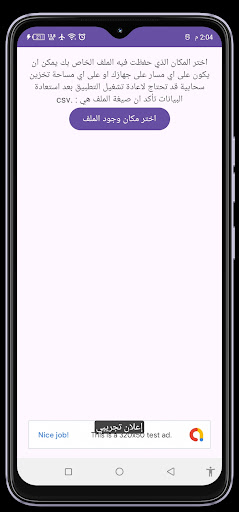
From the main menu there is an option "Import and export data to a file" which enables you to share the database via Bluetooth, social media programs, email or cloud storage. By importing, you choose the file that you saved yourself as a backup copy in the place where you also saved it to retrieve the data from the date of making a backup copy, which is a very important step to protect your data from loss.