Core SOS Logic
SOS Activation: The emergency sequence can be triggered by pressing the large SOS button on the main screen.
Shake-to-Activate: The SOS sequence can also be triggered by shaking the device, even when the app is in the background. This feature can be enabled or disabled in the settings.
Sends SMS with Location: Upon activation, the app immediately sends an SMS to all saved emergency contacts. The message includes an emergency alert and a link to the user's current GPS location on Google Maps.
Sequential Calling: After sending the SMS messages, the app begins to call each emergency contact one by one. There is a 2-second delay between each call attempt.
Cancel Sequence: An ongoing SOS sequence can be cancelled at any time by pressing the "Cancel" button on the persistent notification.
Contact Management
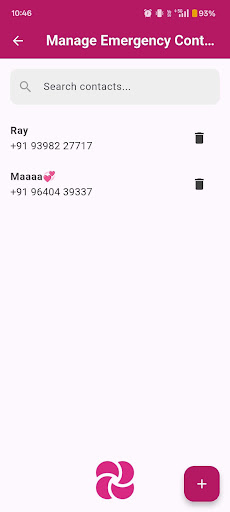
User-Managed Contacts: Users can add and delete their own list of emergency contacts (up to 5).
Contact Picker: The app uses the Android contact picker to allow users to easily select contacts from their phone's address book.
Reliability
Foreground Service: All SOS logic (SMS and calling) runs in a foreground service. This makes the process highly reliable and prevents the Android OS from killing the app while an emergency sequence is in progress.
Background Shake Detection: The shake detection also runs in a persistent background service, ensuring it is always available when enabled.
Re-triggerable: A new SOS sequence can be triggered at any time, even if a previous one was already active.
How to Use
Launch the app.
Go to "Manage Contacts" to add up to 5 emergency contacts from your phone's address book.
In the same screen, you can enable the "Shake-to-Activate" feature if desired.
Return to the main screen.
Press the large red SOS button or shake your phone (if enabled) to start the emergency sequence.
To cancel, pull down the notification shade and tap the "Cancel" button.