Ergonomics keyboard >>
It is unnatural that the direction of finger and Smartphone (Keyboard) is mismatched.
So the direction of Keyboard is changed to suitable angle for finger.
Half 50-on keyboard >>
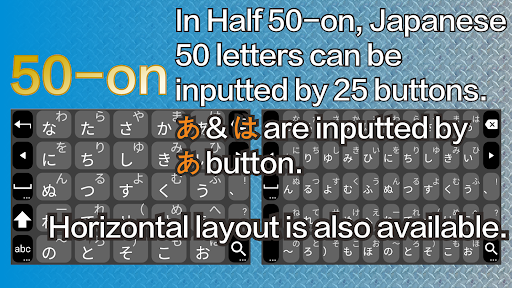
In Japanese traditional layout keyboard, so called 50-on, the size of its key becomes very small in Smartphone. Thus, its operation is so difficult in practice.
Our half 50-on keyboard is optimized for Smartphone. The each key is assigned two letters.
Gesture typing >>
It is also known as Swipe typing, Glide typing, or QuickPath. It is worked well in our Japanese keyboard.
Various layout >>
- Ergonomics FLEX keyboard: Natural input is realized.
- Ergonomics BASIC keyboard: Natural input is realized.
- 12 Keys keyboard: General keyboard for Japanese
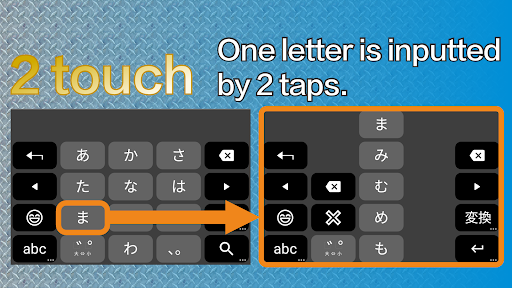
- 2 touch keyboard: Each letter is inputted by 2 taps.
- Large flick keyboard: Flick keyboard with the large button for small Smartphone
- Horizontal Half 50-on keyboard
- Vertical Half 50-on keyboard
- JIS (PC keyboard layout with JIS input)
- QWERTY keyboard (Romanji input)
- Godan keyboard (Romanji input)
Stableness >>
- Developed in Japan
- Developed based on Mozc that is open-source of Google Japanese Input
(Note that it is integrated into Gboard in 2020.)
Requirements >>
Android 7.0 or later
Notice >>
- Your entered all information isn't send to us.
- Internet connection is not needed. But it is needed when you see help, terms of service, privacy policy, and ads.
Usage >>
Please read guide or help within Setting after install.
Setting screen can be shown:
1. Tap an icon of Iaponia in App drawer.
2. Tap bottom-left key (abc, 123, or あいう) during a few seconds.
FAQ >>
- Q: The following dialog is shown. Is it no problem?
> Attention
> This input method may be able to
> collect all the text you type,
> including personal data like
> passwords and credit card numbers.
> It comes from the app Iaponia. Use
> this input method?
> [Cancel] [OK]
- A: It is no problem. Please tap OK.
- Explanation: It is always shown for new Keyboard App.
This App (Iaponia) does not send any data that are inputted by you.
- Q: Don't show ads.
- A: It is needed to continue development and maintenance.
Please consider to watch video ads. As a result, navigation bar isn't shown for 7days.
- Q: Contents of ads are seemed to respect my browsing history.
Is my entered information with this App send to Internet?
- A: No, it isn't sent.
Ads of this App (Iaponia) is managed by AdMob of Google. Contents may be choiced by browsing history within Google.
- Q: Where are import/export of User dictionary?
- A: Store a file into your Smartphone's storage for import. The file must be a text file or a ZIP file that is contained the former text file. Share it with "Files by Google" and so on to Iaponia Dictionary tool.
Operate to export with "Export current dictionary" of "Dictionary Tool" in Setting screen.