Secure and Trusted Multi-Chain Wallet
Introducing our BNB Wallet App – your all-in-one solution for securely storing and managing Binance Coin (BNB) and other BEP-20 tokens. Experience the power of decentralized finance in the palm of your hand with our feature-rich and user-friendly wallet app.
Key Features:
Securely store and manage your BNB and BEP-20 tokens with ease.
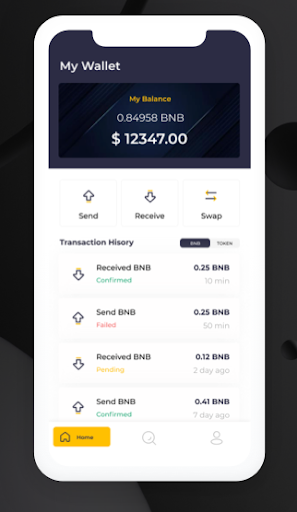
Conveniently send and receive BNB and other supported tokens.
Access your wallet anytime, anywhere, with seamless mobile integration.
Enhanced security measures to protect your digital assets, including password protection and encrypted private keys.
Effortlessly view your transaction history and track your portfolio balance.
Explore and connect with the Binance Smart Chain ecosystem, including decentralized applications (DApps) and decentralized finance (DeFi) platforms.
Participate in token swaps and decentralized exchanges (DEX) to trade your assets directly from the app.
Seamlessly connect with hardware wallets for added security and convenience.
Stay informed with real-time market data, including price charts and token metrics.
Support for multiple languages to cater to a global user base.
Dedicated customer support to assist you with any inquiries or issues.
Experience the future of decentralized finance with our BNB Wallet App. Take control of your BNB and BEP-20 tokens, securely manage your assets, and unlock the full potential of the Binance Smart Chain ecosystem.
Download now and join the decentralized revolution!
Multi-Chain Asset Management
Manage your BNB, BTC, ETH, EOS, ATOM tokens on BNB Chain, BNB Smart Chain, or the Ethereum network easily.
Swap
Swap tokens directly from your desktop or mobile wallet. The Swap feature combines data from decentralized exchange aggregators, market makers, and DEXs, to ensure you get the very best price with the lowest network fees.
BNB wallet comes with a Web3 browser that can be used to interact with DApps on Binance Smart Chain and Ethereum network. It offers seamless, simple and secure connection.
What is Gas Fee?
Gas fee is a fee paid to a network so as to complete a transaction on a blockchain.
How to recover my fund sent to the wrong network
By default, Binance Extension Wallet supports 3 networks:
* Binance Chain
* Binance Smart Chain
* Ethereum
Creating a new wallet
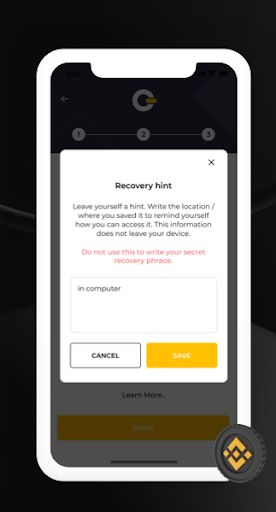
After logging in to the app’s home screen, you can create a Multi-chain wallet by following these steps:
Step 1: Click Create Wallet on the home screen.
Step 2: Write down your seed phrase
Step 3: Click Continue and verify your seed phrase.
How to Add a Custom Token?
Click “Import Token” on the right corner
Paste the contract address.