With Quiz Maker now you can create various types of stunning quizzes, save, play, import, and share your quizzes with whoever you want — friends, students, classmates, colleagues, family — learning is more fun together! Generate ultra HD quiz images, all in one place! With simplistic design, anybody can create quizzes fast and easy. Works offline, no login or registration required!
Features:
* Create quizzes
- Create quiz with or without image and audio files
- Add multiple images to quiz
- Add multiple audio files to quizzes
- Up to eight types of quiz supported (Multiple choice - Single Answer, Multiple choice - Multiple Answers, Arrange in Order, Match Column, Closed ended - Single Answer, Closed Ended Multiple Answers (unordered), Closed Ended Multiple Answers (ordered), and Fill in the Blank)
- Animated GIF support
- Add topic to the quiz or select from built-in topic list
- Auto paste feature to automatically paste the text you previously copied into title and options
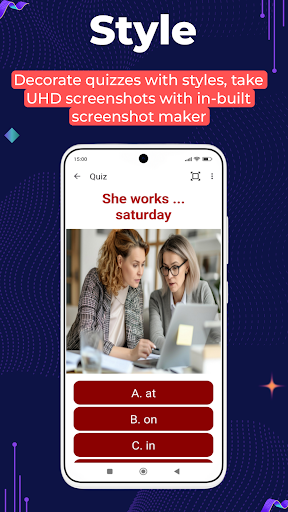
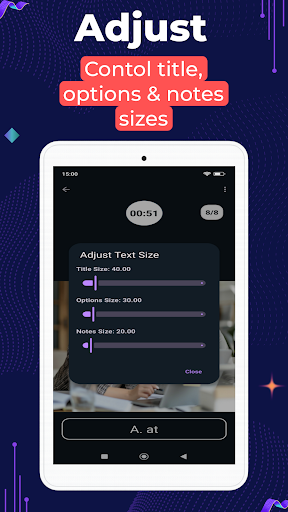
- Change Text size & Color
- Change options background color
- Change Options shape
- Change Options style
- Remove/Update quiz image
- Add Notes to the quiz
- Option to reduce size of the added image to save space
- Copy & Share quiz
* Save Quizzes
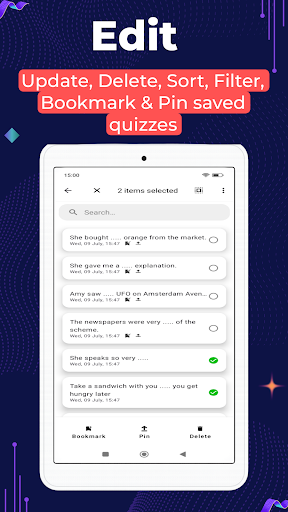
- Save quizzes & edit it later
- Search, Delete, Bookmark, Pin, Sort and Filter
- Powerful filtering to filter based on topic, quiz types and creation date
- Update title, options, topic, images & audio
- Take ultra HD screenshots
- Delete opened quiz
- Delete all Quizzes with single click
- Remove/Update/Add new quiz image/audio
* Play Quiz
- Switch between auto proceed to next quiz and manually submit answer
- Option to change selected options in manual submit mode
- Two types of adjustable timers - Total time for all quizzes and individual timer for each quiz
- Countdown, show/hide timer, questions count, randomize quiz, shuffle options position, highlight correct answer, countdown and alert sounds, different scoring policy
- Categorized quiz topics and quiz types with quiz count indicator. Play only the topics and quiz types you are interested in
- Play audio files
- Change quiz sounds. Choose from built-in sounds or add your own sound file from device
- Display quiz type info
- Shows score once the quiz is finished and lets you share score
- Option to skip/stop quiz
- Play quiz in full screen mode
- Replay wrong answers
- Show/Hide image while playing quiz
- Auto scroll multiple images
- Auto pause quiz on app minimize
* View Score
- View your score after finishing the quiz
- View correct answers
- Share score
- Check total played/skipped quizzes count
- Displays total time taken to finish the quiz
* Analyze performance
- With powerful charts evaluate your performance
- Filter charts by topic/time
- Various chart types
* Export & Import Quizzes
- Export created quizzes based on creation period & topic
- Password protect exported quiz file
- Import quizzes created by others
- Import quizzes temporarily
- Option to include creator info like name, email, social media profiles, donation ids etc while exporting
- Creator info displayed when importing quizzes, lets others see creator info and donate
- Option to lower image quality to reduce export file size
- Option to exclude images while exporting quiz
* Take Screenshot
- Built-in screenshot feature
- Feature to choose screenshot quality (1080p, 2K/QHD, 4K/UHD, 8K Ultra HD & Device Default) independent of your devices' resolution
- Option to choose from different screenshot aspect ratios (1:1, 3:2, 5:4, 4:5, 16:9, 9:16 & Default)
* Choose Font
- Option to choose from built-in fonts or add your own font from device
- Choose font style (Bold, Italics, Bold Italics, Underline)
* Add Notes
- Add notes to the quiz
- Show/Hide/Update notes
* Back up & Restore
- Option to back up and restore quizzes. Helps you keep your quizzes safe in case of device failure, loss, accidental data loss or device change
* Theme
- Dark & Light themes
And more....