Scoreva – Smart Exam Scanning
Scoreva – Smart Exam Scanning uses advanced AI to scan, detect, and score paper-based exams, quizzes, and handwritten test papers. Capture answer sheets with your phone camera, automatically detect marked answers or written responses, review flagged items, and view results in seconds.
Why Scoreva
✅ AI-powered scanning – processes OMR and handwritten test papers
✅ Accurate mark detection – reads lightly shaded bubbles and reduces false blanks
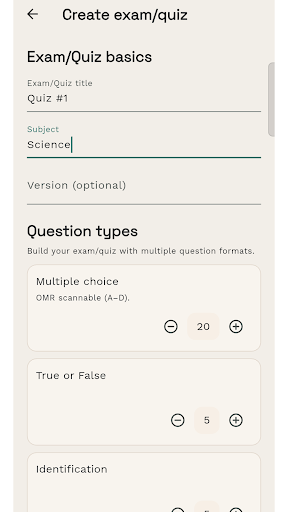
✅ Multiple question type support – handles objective and structured assessments
✅ Handwritten answer support – detects and interprets handwritten responses (supported formats)
✅ Smart review flags – highlights unclear answers for teacher verification
✅ Exam & Quiz modes – strict grading for exams, fast checks for quizzes
✅ Answer sheet generator – automatically creates printable answer sheets
✅ Organized workflow – manage exams, sections, and scan history
Supported Question Types
• Multiple-choice (A–D bubble format)
• Fill in the Blanks
• Identification
• Matching Type
• Ranking / Ordering
• True or False
• Short-answer handwritten tests (supported layouts)
• Practice quizzes and classroom checks
How It Works
Create an assessment (exam or quiz)
Select question types and define the answer key
Generate answer sheets (optional)
Scan papers using live camera guidance
Scoreva detects answers using AI
Review flagged items (optional)
View scores and summaries
Key Features
• AI-assisted OMR scanning
• Handwritten answer recognition (supported formats)
• Support for multiple question types
• Built-in answer sheet generator
• Live scan quality guidance
• Automatic scoring and summaries
• Review queue for flagged answers
• Scan history and exam insights
Permissions (Why Scoreva Needs Them)
• Camera – to capture exam and handwritten papers
• Photos/Media/Files (Read) – to import existing images (optional)
• Storage/Files (Write) – to save generated answer sheets (optional)
• Internet – required for AI processing or online features (optional)
Scoreva is built for real classrooms:
scan → review → score
Save time, reduce manual checking, and handle both objective and handwritten assessments with confidence.