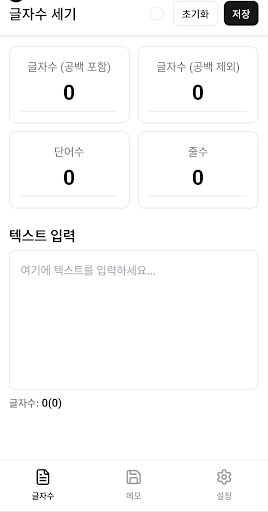
This app is a lightweight character counter and memo tool designed for anyone who writes. It shows real-time counts for characters (with and without spaces), words, and lines as you type. You can also save and manage notes, assign colors for visual organization, and keep your writing structured. It's useful for blogs, assignments, SNS captions, project documents, translation work, and any task requiring accurate text measurement.
Key Features
Real-time Character Count
Displays characters with and without spaces in real time.
Word Count
Counts words based on spaces, working for both English and Korean.
Line Count
Instantly calculates the number of lines in the current text.
Memo Storage
Save notes locally on your device or optionally sync to the cloud.
Color Labels
Assign colors to notes to visually separate categories and priorities.
Folders & Search
Organize memos with tags/folders and quickly find them using keyword search.
Export & Share
Copy text, export as .txt or .md, or share to other apps.
Auto-Save (Optional)
Prevents data loss with adjustable auto-save intervals.
Dark Mode & Font Options
Comfortable dark theme plus adjustable font size and line spacing.
Document Statistics
View summary stats—characters, words, lines—for any selected memo.
Offline Support
Core features work without an internet connection.
Use Cases
Blog writing — Set a target length (e.g., 1,200 chars) and monitor it live.
Assignments / Drafts — Easily check character counts excluding spaces.
SNS captions — Stay within character or word limits for Twitter/Instagram.
Meeting notes — Use colors and tags to label priorities.
Settings (Customization)
Default count mode (with/without spaces)
Storage location (local device / cloud services like Google Drive)
Memo color palette (8 default colors + custom picker)
Auto-save interval (off / 10s / 30s / 60s)
Backup & restore tools
Permissions
Storage: Required for saving notes locally
Cloud access: Optional; needed only when using cloud sync
Internet: Optional; used only for cloud syncing