📌 Stream Calendar – Project-based scheduling and time management for modern teams
Stream Calendar is a powerful time management and scheduling app designed for organizations that run on projects, tasks, and structured meetings. It helps teams schedule meetings, organize tasks, and manage personal and work appointments across users in a single, unified calendar.
Fully integrated with Stream Planner, Stream Calendar connects your meetings and tasks directly to portfolios, projects, and actions. This ensures that every discussion, decision, and task is traceable back to the work it belongs to.
Developed as a companion to Creative Solutions’ Stream Planner software. Stream Calendar ensures secure, fast, and organized schedule between team members, departments, and stakeholders.________________________________________
🔹 Key Meeting & Scheduling Features
✅ Organization-wide calendar – Schedule meetings, tasks, and personal appointments across users within your organization.
✅ Linked with Stream Planner – Create and manage project-related actions and tasks directly from meetings and agendas, with the option to convert assigned tasks into full projects.
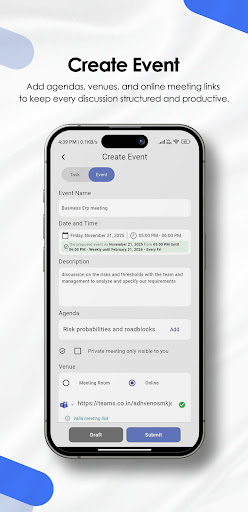
✅ Single & recurring meetings – Schedule one-time or repeating meetings (daily, weekly, or monthly) based on your team’s needs.
✅ Rich meeting context – Attach portfolios, projects, emails, documents, and external meeting links (Microsoft Teams, Zoom, Google Meet, etc.) to each meeting so everyone has the full context in one place.
✅ Admin & attendees – Every meeting has an admin who controls the session, and attendees who can participate, add notes, and receive reminders.
✅ Dynamic invitations – Invite additional users at any time—not just while scheduling. New attendees automatically see the meeting in their own Stream Calendar.
________________________________________
🔹 During the Meeting
✅ Start, pause, resume, end – Meetings can be started on the scheduled time and controlled by the admin, including pausing and resuming when needed.
✅ Agenda-based discussions – Structure your meetings into agendas and mark each agenda as completed once it is discussed.
✅ Shared notes per agenda – Attendees can record notes for each agenda item after the meeting has started, ensuring discussions are captured properly.
✅ Private notes for attendees – Each attendee can maintain private, personal notes visible only to themselves for better personal tracking and follow-up.
✅ Task assignment from agendas – Any attendee can assign tasks related to a specific agenda to other users. The recipient can convert that task into a project (via Stream Planner) or reject it with proper status tracking.
✅ Attendance tracking – Automatically record when each attendee joins and leaves the meeting through meeting activity logs, providing a clear history of participation.
________________________________________
🔹 After the Meeting
✅ Completion summary report – Once the admin ends the meeting, Stream Calendar generates a completion report showing:
• Contributors and attendees
• Total and per-user durations
• Agendas discussed and remaining
• Tasks created and assigned during the meeting
This makes Stream Calendar ideal for governance, audits, and structured follow-ups.
________________________________________
🔹 Smart Reminders & Notifications
✅ Instant notifications – When a new meeting is created or updated, all attendees receive notifications.
✅ Multi-level reminders – For each scheduled meeting, reminders are automatically triggered 1 hour, 30 minutes, and 5 minutes before the start time to help everyone join on time.