Green Monitor is a crop monitoring app. It tracks plant growth automatically — saving time and money, with no expensive sensors required.
Track and compare your plant growth accurately and economically.
Unlimited devices with one subscription.
Designed for greenhouses, vertical farming and lab trials.
Place your phone or tablet in a fixed position, and the app will automatically capture photos at regular intervals and send the data to you. The web-based dashboard then processes and analyzes the data to provide clear insights.
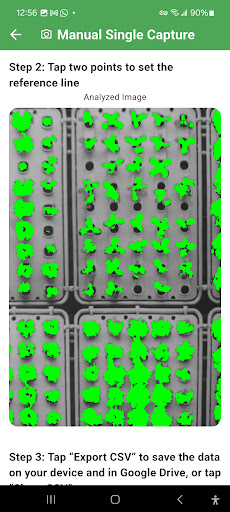
Get green coverage (%), green area (cm²), and plant height/width (px & cm).
This app is designed to analyze both individual plants and entire canopies. For canopy analysis, the measured green coverage, height, and width refer to the overall canopy area.
WHY GREEN MONITOR
• Practical measurements from ordinary photos — no special hardware
• Unlimited devices with one subscription
• On-device processing: photos are analyzed locally, not uploaded
• Designed for CEA (greenhouses, vertical farms) and lab trials
• Simple workflow that anyone on the team can follow
WHAT YOU CAN MEASURE
• Green area % of the image (proxy for canopy/leaf cover)
• Green area (cm²) using a user-defined reference length
• Plant height & width in pixels and centimeters
• Time series of the above for growth tracking
HOW IT WORKS
1. Set Green Threshold once to highlight plant pixels (green) vs. background (gray).
2. You can choose Manual or Automated mode.
3. Calibrate by tapping two points and entering their real distance (cm).
4. Results are automatically saved to your Google Drive and can be shared with collaborators as needed.
CAPTURE MODES
• Manual Single Capture – analyze one photo quickly.
• Manual Multiple Capture – capture a series with the same calibration (ideal for short sessions).
• Auto Multiple Capture – automatic photos at set intervals (6, 12, or 24 hours) for long-term tracking.
TIPS FOR RELIABLE RESULTS
• Keep the phone or tablet stable and the plant at a consistent distance.
• Use a clear reference object at the same distance as the plant.
• Avoid green backgrounds (including green pots, mats, or clothing).
• Portrait orientation is required to apply the reference length consistently and ensure accurate measurements.
• Top-view measurements are supported (the “height” reading will represent the plant’s width in that setup).
PRIVACY & DATA
• On-device processing: your photos never leave your device. We don’t upload them or use them for training. Overlay images are preview-only and not saved.
• Sign-in required: Google Sign-In (internet required). We store minimal account + device metadata in Firebase to authorize access and enforce one active device per account.
• Subscriptions: RevenueCat/Google Play verify entitlements; we don’t receive your full payment details.
• Exports you control: CSVs are created on your device. Save on your device, email them, or save to Google Drive when online.
WHO IT’S FOR
• Growers and agronomists in controlled environment agriculture
• Researchers running growth or stress trials
• Educators and students measuring plant development
• Hobbyists monitoring houseplants or garden beds
LANGUAGES
• Instructions available in English, Español, Français, Deutsch, Italiano (button labels remain in English).
SUBSCRIPTION & TRIAL
Green Monitor offers an auto-renewing subscription with a free trial (if eligible) to unlock full analysis & tracking features.
• Unlimited devices with one subscription
• Manage, pause or cancel anytime in Google Play
• Pricing and any trial offer are shown during checkout in your local currency
NOTE
Green Monitor provides estimates derived from images and user calibration. For critical decisions, consider verifying with physical measurements.