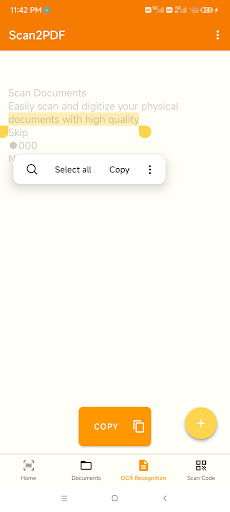
Scan2PDF is a practical and reliable document scanning app that helps you turn photos, notes, and receipts into clear, professional-quality PDF files.
With powerful on-device OCR text recognition and a built-in QR code scanner, Scan2PDF makes document digitization simple, efficient, and secure — anytime, anywhere.
? Key Features
?️ Image to PDF
Easily convert images from your camera or gallery into high-quality PDF documents.
You can adjust the page size, orientation, and margins before saving.
The resulting PDFs are lightweight, crisp, and ready for offline use.
? OCR Text Recognition
Extract editable text directly from your scanned images using built-in OCR (Optical Character Recognition).
Scan2PDF supports multiple languages, allowing you to copy and reuse printed text conveniently without needing an internet connection.
? QR Code Scanner
Quickly scan and decode QR codes using your device’s camera.
View, copy, or store QR information safely within the app for easy reference.
? Smart Document Management
Keep your files neatly organized — rename, sort, or delete scanned PDFs and recognized text files with just one tap.
Scan2PDF ensures all your important documents stay clear, well-arranged, and easy to find.
✂️ Image Enhancement Tools
Enhance your scans before conversion with automatic edge detection, brightness and contrast adjustment, and color filters.
You can crop, rotate, and fine-tune images to achieve clean, readable results every time.
? Secure & Private
All processing takes place locally on your device.
No cloud uploads or external connections are required.
Your scanned data and recognized text remain private, fully under your control.