Client dashboard
Account FAQ
- How do I view my profile?
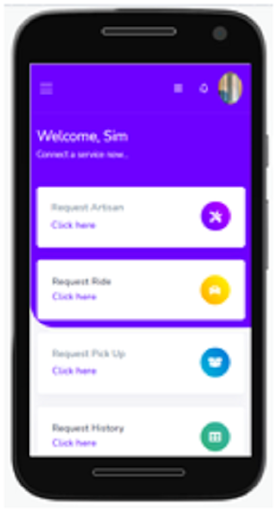
Click the User icon, just right beside the notification bell at the top of the dashboard page. A dropdown will appear, then select “My profile” to view your profile.
- Can I change my Email address?
No, you cannot.
- Can I change my Phone Number?
Yes, you can. Do that on the profile page.
- How do I change my address?
When you go to “my profile”, you will see “Addresses”. You can change your address there.
- I want to change my account password, how do I do it?
Click the User icon, just right beside the notification bell at the top of the dashboard page. A dropdown will appear, then select “Account” to view your profile. Here, you will be asked for your old password and the one you want to change it to. You can also change your Username here.
Functionality FAQ
- How do I check my notification?
Click the bell icon on the top of the dashboard, and you can view all notifications.
- How do I request artisan?
On the dashboard, there is a box that has Request Artisan, click the link “click here” and you can request for any artisan you need.
- Can I view my history?
Yes, you can view your history. Do this my clicking on “click here” in the request history box on the dashboard.
- I want to make a complaint, how do I do it?
If you are using a desktop, you’ll see a “Make Compliant” button by the left side when you are on the dashboard. But if you are using a mobile phone, click on the menu bar at the top left of the dashboard and then click “Make compliant”.
- Can I view the profile of the Artisan I want to request?
Yes, but you cannot view the profile of an artisan until you request them. Once you request an artisan, you will be able to view their profile in your recent request in the dashboard. Once you are satisfied with the artisan profile, you can then send them a request.
Artisan dashboard
- How do I update my profile after creating an account?
Once you login after creating an account, fill in all profile details requested for, your address and submit all address necessary.
- How can I view all the jobs I’ve done?
By the top of the dashboard, click “Job done”
- How can I view all my request?
By the top of the dashboard, click “Request”
- Can I edit my billing details?
Yes, you can do that either by going to the top of the page or by clicking the user Icon at the top, then click “Billing and payment”.
- Can I view my billing history?
Yes, you can do that either by going to the top of the page or by clicking the user Icon at the top, then click “Billing and payment”, then click “history”.
- How can I upload images to my gallery?
Do that by clicking Gallery at the top of the page.
- I want to change my account password, how do I do it?
Click the User icon, just right beside the notification bell at the top of the dashboard page. A dropdown will appear, then select “Settings”. Here, you will be asked for your old password and the one you want to change it to. You can also change your Username here.