Are you aware of how much sugar you consume every day? It can be underestimated! Meet SugarCounter, a simple yet powerful app designed to help you monitor your sugar and calorie intake consciously. Free of charge, no ads, no sign-ups, and no data sent to external servers. Everything is stored locally on your device. A minimalist design offers pure functionality and no distractions.
SugarCounter isn’t just about logging numbers — it’s about creating awareness of what you eat. By adding sugar gram values to the database by yourself, you become more mindful of your consumption patterns. Unlike apps that fetch data automatically, SugarCounter encourages you to reflect on the gram numbers.. By logging snacks and meals, you gain a deeper understanding of your sugar intake patterns — helping you make informed choices.
Key Features
1. Counter Screen: Log Your Sugar and Calories Effortlessly
* Track Sugar: Log sugar per piece or per 100g — perfect for packaged foods.
* Calorie Tracking: You can also enable calorie tracking in the settings.
* Barcode Scanning: Save time! Scan barcodes to auto-fill previous entries.
* Custom Date Entries: Record past intakes effortlessly.
* Warnings: Get alerts if you exceed your daily sugar or calories limit.
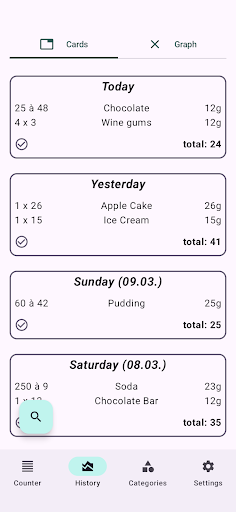
2. History Screen: Visualize Your Progress
* Daily Cards: See a day-by-day breakdown of your sugar and calorie intake.
* Graphs: View trends in a sleek line chart — understand your habits at a glance.
* Search Function: Quickly find specific foods or dates.
3. Category Screen: Manage Your Food Data
* Food Database: Organizes every food item you log.
* Detail View: Check sugar and calorie content for each category.
* Personalized Data: Tailored to your entries, not generic databases.
4. Settings Screen: Customize the App
* Daily Limit: Set a personal sugar limit — e.g., 50 grams as recommended by the WHO.
* Export Data: Backup your entries or share them with nutrition experts.
* Auto-Delete: Manage storage by deleting old entries automatically.
* App Theme: SugarCounter adapts to your system’s default color scheme for a seamless look.
* FAQs and Introduction: Get started quickly with our helpful guide.