Kapil CRM – Mobile Application Overview
Login Options:
Kapil CRM is a mobile-only application designed for organizational sales teams. Users can securely log in using one of two methods:
OTP-based login via mobile number
Username and password-based login
Dashboard Overview:
Once logged in, users are greeted with “Welcome {Username}”, followed by various key performance sections displayed as cards:
Today's Activity: Real-time data showing leads generated, and offline/online meetings scheduled for the day.
Monthly Activity: A summary of leads, lead-related meetings, unique leads, and total sales for the current month.
Weekly Demographic: A bar chart visualization showing meetings (orange) and tasks (green) for each day of the current week.
Product Monthly Activity: A pie chart representing lead distribution across different products, each distinguished by color.
Status Statistics: A bar chart showing the current status of tasks and meetings (open, in-progress, completed, cancelled).
Month-wise Product Sales Report: Displays each product's monthly performance, including the number of units sold and total sales value.
A quick access row is available at the bottom, linking directly to:
Leads
Meetings
Tasks
Profile
Leads Management:
Tapping the Leads icon opens a full list of leads, shown as individual cards with details like email, contact number, and ad name.
Create New Lead: Via the “+ Create” button at the top right.
Search: Search by lead name with a reset option to clear results.
Filters: Refine by status (New, Converted, Dropped) or advanced options like lead owner, product, source, gender, occupation, and generation date.
Lead Details View:
Upon selecting a lead, a detailed view opens, showing contact details, associated tasks, meetings, and overall engagement. The bottom navigation changes to:
Overview: Complete summary of lead activity.
Tasks: View tasks assigned to this lead, searchable by name.
Notes: Add/view/delete notes. Attach files as needed using the “Pick a file” option.
Meetings: Schedule or view meetings. Fields include meeting name, description, date/time, type, status, and attachments.
Activity: Displays a timeline of actions (tasks, notes, meetings) as individual cards.
Meetings Management:
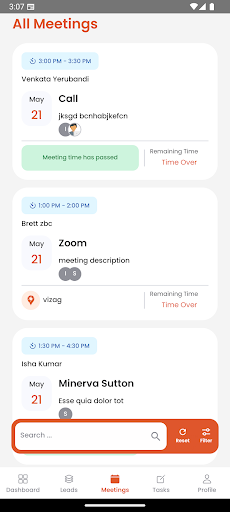
All meetings across the user's profile are listed in a separate Meetings section:
Displayed as individual cards.
Clicking a meeting shows details including Lead ID and Meeting ID.
Meetings can also be created or managed from within a lead’s detail view.
Tasks Management:
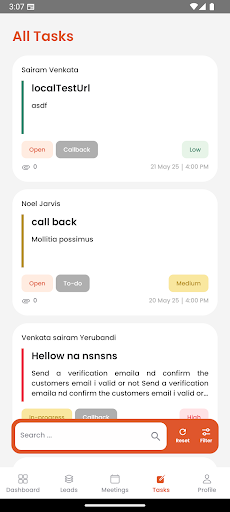
Similar to meetings, all tasks are displayed as cards. Users can view detailed task info by tapping a card. Tasks assigned to leads are also accessible under that lead’s detail page.
Notes Management:
Users can manage notes from the Notes tab in the lead detail page. Each note can be edited or deleted. File attachments are supported.
Profile Section:
Employees can view, but not edit, their profile details. Any corrections must be requested through administrative channels.
Core Features Summary:
Secure Mobile Login via OTP or password
Mobile-Only Compatibility
Personalized Dashboard Greeting
Real-time and monthly summaries of leads, meetings, and tasks
Visual analytics: Bar charts and pie charts for quick insights
Lead and Meeting Management with detailed filtering and search
Non-editable Profile View for data integrity
Advanced Note and File Handling
Activity Timeline for leads
Target Audience:
This app is tailored for employees involved in lead generation, client meetings, and customer onboarding. It supports sales operations with intuitive, visual, and searchable tools to manage all customer engagement effectively on the go.