Welcome to Opelink!
Download the Opelink application and follow the news from your community in real time from your mobile.
HOW TO ACCESS?
Accessing the Opelink app is very easy! You just have to use your usual Opelink username and password. If you have any questions about accessing the application, you can contact the Opelink Staff by writing to:
[email protected]
WHAT WILL YOU FIND?
- Information about products, the brand, events, launches, and many more key topics of the OPEL brand!
- Good practices of the network and useful information to work in your day to day
- Messages from the Brand to inform you of the most important topics
- The materials you need most for your daily work: through the section "Useful documents" -> "Click here to consult and download ..." you can download the documents of your choice and add them to the application to always have them within reach From your hand.
- Forums: you can interact with your colleagues in the platform's forum commenting on your doubts, providing advice or ideas and being part of all the news. A new way of communicating with which you can write messages at any time from your mobile!
HOW DOES IT WORK?
Navigating the Opelink APP is very intuitive and comfortable! Not only will you receive notifications about the most important content published in the Community, you will also be able to consult and download the files necessary for your day-to-day life, as well as use the Forum from wherever you are.
In the top navigation bar you will find the 'Notifications' icon (bell): in this space you will only see notifications about the articles published in Opelink that interest you the most, depending on the topics you have chosen. You can customize the content you want to be notified about by choosing your favorite topics in the same section, clicking on the "Settings" icon.
JOIN NOW!
In the navigation bar at the bottom of the screen you will find the following icons:
1. HOME icon
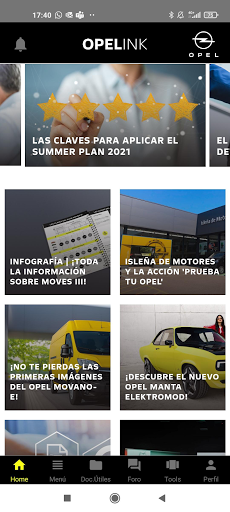
It is the main page, where you will find the most outstanding news of the day.
2. Menu icon
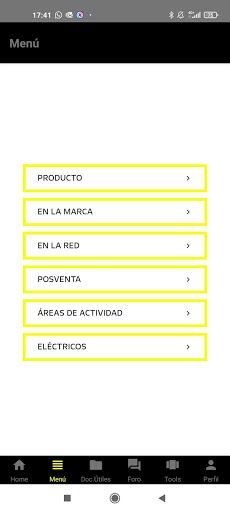
From here you will be able to access the different sections and consult the content that interests you the most at all times.
2. Useful Documents Icon
In this section, by clicking on "Click here to view and download your documents", you can search for the document you want and download it by clicking on "Add to the application." In this way you will be adding the most useful files to your documents. daily work, so that you always have them just one click away!
3. Forum icon
In this section, you can interact with your colleagues as you have always done, sharing your impressions and doubts or making useful comments to enrich the community.
4. Your Profile icon
Here you will find a summary of your personal data, as you registered it with Opelink. Don't forget to complete it with your best photo! 😊
You have more questions? For any questions or information related to the Opelink application, do not hesitate to contact us by sending an email to
[email protected]