🌎 Explore the World with All Languages Translator OCR! 🌍
Embark on a journey of global communication and understanding with the All Languages Translator OCR app. This powerful tool not only translates text across numerous languages but also employs Optical Character Recognition (OCR) to convert images into editable text. Seamlessly bridge language barriers and access multilingual information effortlessly.
**Features:**
🔤 **Text Translation**: Translate text between over 100 languages, enabling effective communication regardless of language differences.
📸 **OCR Image Translation**: Capture images of printed text or handwritten notes and let OCR technology convert them into editable text for translation.
🌐 **Support for Popular Languages**: Translate between major languages like English, Spanish, French, German , Bangla, Hindi, Chinese, Japanese, and more.
🚀 **Instant Translation**: Experience real-time translation for both text and image content, ensuring quick and accurate results.
💬 **Voice Input**: Use voice input to dictate text for translation, making communication even more convenient.
📋 **Saved Translations**: Access your translation history for easy reference and retrieval of previously translated content.
🔊 **Text-to-Speech**: Listen to the translated text in native pronunciation to enhance understanding.
🌟 **User Manual:**
1. 📥 **Download and Install**: Start by downloading and installing the app from the provided link.
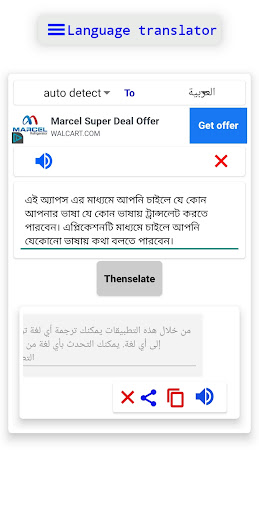
2. 🔤 **Text Translation**: Input text in the source language, select the target language, and tap "Translate" to get instant results.
3. 📸 **OCR Image Translation**: Capture an image containing text. The OCR feature will automatically identify the text and offer translation options.
4. 🔊 **Text-to-Speech**: Tap the speaker icon next to the translated text to listen to the pronunciation.
5. 🌐 **Voice Input**: Tap the microphone icon, speak the text you want to translate, and let the app process your voice input.
6. 💬 **Saved Translations**: Access your translation history by tapping the history icon for quick retrieval.
**App Link**: [All Languages Translator OCR](play_store_link_here)
📲 Break down language barriers with All Languages Translator OCR. Download now and unlock a world of multilingual communication!
🌟 **Note**: Rest assured, we prioritize your privacy. This app doesn't collect personal information and ensures the security of your data.