Transform how you consume content on Android with Arc, your intelligent screen assistant. Arc is an accessibility-first productivity tool that helps you understand, listen to, chat with, and save any on-screen content with a single tap.
Tired of endless scrolling? Overwhelmed by information? Arc gives you the power to understand more, faster.
? NEW IN VERSION 1.0.5
⚡ Custom AI Actions: Create your own AI workflows! Build actions like "Translate to Spanish," "Explain Like I'm 5," "Fact Check," or "Extract Action Items" - all accessible instantly from the floating sidebar.
? Community Actions: Discover 25+ pre-built AI actions from the Arc community - Fact Checker, Calorie Finder, Math Solver, Meme Explainer, Smart Reply, and more!
? Chat with Your Screen: Ask questions about anything on your screen. Get instant AI-powered answers with context-aware conversations. Attach screenshots for visual context.
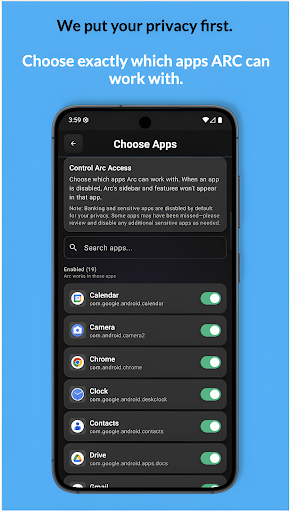
? App Management: Control which apps Arc works with. Banking apps, password managers, and 400+ sensitive apps are automatically blocked by default for your privacy.
? CORE FEATURES
⚡ Instant AI Summaries: Get concise, AI-powered summaries of articles, emails, and social media posts without leaving your current app. Save time and conquer information overload.
? Listen to Your Summary (AI Read): Hear a natural-sounding audio version of your AI summary. Auto-detects 100+ languages for optimal voice selection. Perfect for multitasking.
? Save What Matters: Capture important information with a single tap. Arc saves a summary and an optional screenshot (with your consent), encrypted securely on your device for later access.
✨ Seamless Floating Sidebar: An elegant, always-available sidebar floats over any app, giving you immediate access to all features without interrupting your workflow.
♿ DESIGNED FOR EVERYONE
While Arc boosts productivity for all, it was built on a foundation of accessibility. It serves as an essential assistive technology for users with dyslexia, low vision, reading challenges, or ADHD by making content more digestible.
• WCAG 2.1 Level AA compliant
• Full TalkBack support
• Reduced motion options
• High contrast design
? PRIVACY YOU CAN TRUST
User-Controlled: Arc only accesses screen content when you explicitly tap a button. There is no background monitoring.
Private by Design: On-screen text is processed ephemerally and never stored on our servers. All your saved content is encrypted and stored only on your device.
No Ads: Arc is completely ad-free for a clean, distraction-free experience.
Optional Login: The app is fully functional in Guest Mode. An optional Google Sign-In is available for features like cloud backup.
---
ACCESSIBILITY SERVICE DISCLOSURE:
To provide these core features, Arc uses the Android Accessibility Service.
This service is used ONLY to read the text content from your screen when you explicitly tap a sidebar action (AI Summary, AI Read, Save Content, Chat, or Custom Actions). It is also used to capture your screen when you tap "Save Content" or attach a screenshot (after you give explicit consent).
Arc does not monitor your screen in the background and does not collect any data unless you initiate an action.