The PAC Simulator allows you to accurately and accurately simulate the growth of your Savings Plan, even with leverage.
Set the parameters, click PROCESS, and obtain graphs, key metrics, and a complete year-by-year table.
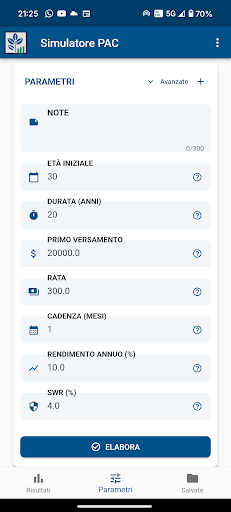
On the Simulation Parameters page, you can configure every aspect of your investment:
- Initial age
- PAC duration
- First deposit
- Installment and frequency
- Annual return
- Safe Withdrawal Rate (SWR)
- Leverage (ratio, method, and cost)
- Option to add a second stage with separate parameters
The app calculates deposits, yield, debt, and interest month by month, creating a realistic and customized simulation.
After running the simulation, you will find:
• Summary cards: Final age, total deposits, final capital, profits, total debt (if any), monthly SWR, and other key metrics.
• "PAC Trend" chart: Annual capital trend with stacked bars (Equity, Debt, Profit). In the case of the second stage, a vertical band highlights the change over the period.
• "Monthly SWR" chart: Shows, year by year, the sustainable monthly withdrawal calculated from your capital.
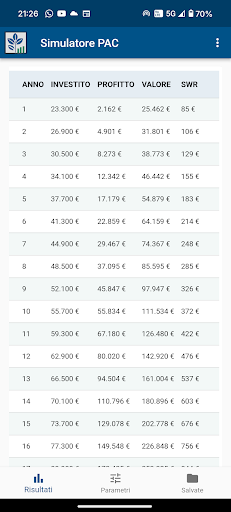
• Year-by-year table: Cumulative invested capital, profit, final value, and monthly SWR, with horizontal scrolling on mobile devices.
With Google login, you can save your simulations in the cloud and access them whenever you want.
- List of saved simulations
- Quick preview of parameters
- Instant viewing
- On the Account page, you can manage logins and logouts in a snap.
PDF export with graphs and a complete summary