Make leveling on construction sites smarter.
With the "Leveling" app, you no longer need a field notebook, calculator, or pencil.
Simply enter the staff reading for automatic calculations, making work smoother and more efficient.
Results are saved within the app and can be output as CSV or images.
Various sending methods allow for instant sharing with relevant parties, supporting rapid response on site.
The field notebook input method supports the "height method." It also includes instructions for use that are easy to understand even for beginners.
[Major Functions and Features]
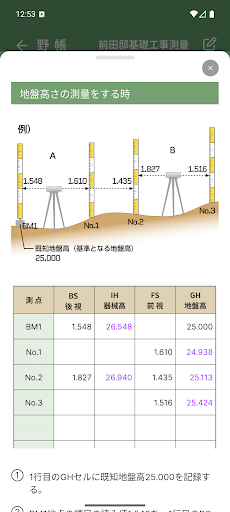
- Automatically calculates instrument height and ground height from benchmark reference height and staff readings.
- Enter the planned height to instantly calculate the staff reading required for stakeouts.
- Freely add and delete rows.
- Color-coded display of input values and calculation results for improved readability.
- Record notes for each site.
- Export survey data in CSV format and edit it in Excel.
- Switch between standard mode and staff mode.
- Staff mode allows for intuitive input with a realistic measurement feel.
- Copy, delete, and edit past data.
- Access the app from the "How to Use" screen. Easy-to-understand explanation of operation and the basics of height-based surveying and stakeout.
- Cloud storage protects your valuable data. In the unlikely event of device loss or malfunction, you can download and use your valuable data from the cloud.
- Data can also be sent and shared in a variety of ways.
- Supports multiple languages.
- Recorded data can be converted to meters, feet-inches, or decimal feet.
- Data recording units are supported: meters, feet-inches, and decimal feet.
- Free 10-day trial, followed by free use for one site. For two or more sites, a monthly or annual subscription unlocks all limitations.
- You can cancel your subscription at any time. Enjoy peace of mind.
- Subscription users can register an unlimited number of sites and send unlimited data.