Warp, Firewall, App Blocking, Backups, and Automatic Updates
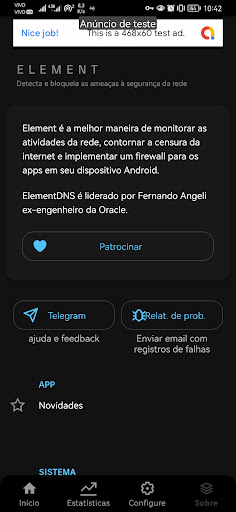
Element is an advanced network security and control app that combines secure DNS, intelligent firewall, and privacy protection into a single lightweight, local, and powerful solution.
Developed by FASOFTS ⚙️ ENGINNER, ElementDNS ensures faster, more private, and ad-free browsing—without requiring root access.
🔒 Key Features
🧱 Intelligent Local Firewall
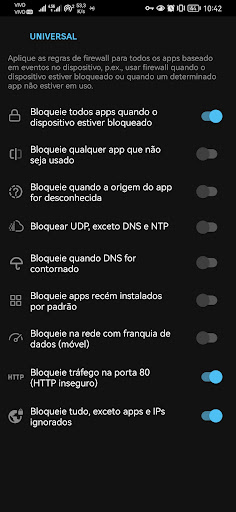
• Block unwanted connections from any app.
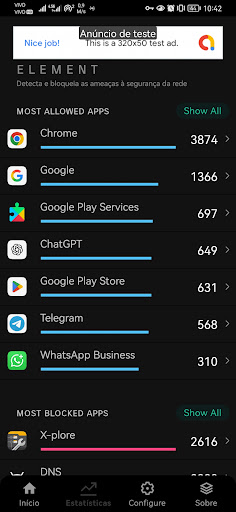
• Monitor real-time traffic (upload and download).
• Detect and block trackers, spyware, and malicious domains.
🌐 Encrypted DNS
• Support for DNS over HTTPS (DoH) and DNS over TLS (DoT).
• Choose between private, custom, or Element Cloud DNS servers.
• Quickly switch between performance and security profiles.
🧠 Enhanced Privacy Protection
• Prevents data leaks from background apps.
• Eliminates known trackers and ads.
• Hides IPs and DNS queries from third parties and internet service providers (ISPs).
⚙️ Full Customization
• Create custom DNS profiles.
• Granular control per application.
• Modern interface with support for light, dark, and deep themes.
📊 Monitoring and Analysis
• Displays detailed usage and blocking statistics.
• Maintains a local connection history, exportable if the user wishes.
• Fully offline operation, focused on privacy.
🛡️ Use of Permissions and Services
🌐 VPN (VpnService)
Element uses VpnService to create a local VPN, responsible for processing and encrypting DNS queries directly on the device.
This service is used only to protect traffic and apply firewall rules — without collecting, inspecting, or redirecting personal data.
🧠 Accessibility (AccessibilityService)
Element uses the AccessibilityService API exclusively to identify when applications enter the background and continue running processes that affect network usage, battery, or device resources. This detection allows the user to view, manage, and limit these processes within the app itself.
The service does not automate, interact with interface elements, simulate touches, or access text, messages, passwords, or content displayed on the screen. All analysis occurs locally on the device, without data collection or transmission. Its use is optional and only activated by the user.
To monitor background application activity that consumes battery, data, and processing power. From Android 11 onwards, some apps are hidden due to package visibility restrictions, which reduces the effectiveness of this monitoring and compromises user security.
Therefore, Element needs to see all installed applications. This permission does not collect personal data. It ensures that Element correctly identifies active apps, including those that try to remain hidden,
allowing it to detect abusive resource consumption, apply firewall and DNS rules precisely, block malicious traffic, and prevent unwanted connections.
Element is not an antivirus, but a network security solution, local firewall, ad blocker, and intelligent monitoring tool.
📸 Camera
The camera is only used to read WireGuard configuration QR codes, simplifying the import of network profiles.
No images are captured, saved, or shared.
🚀 Element's Differentiators
• Solid open-source code base (maintained by Fernando Angeli, Engineer).
• System-level traffic blocking.
• Secure and automatic updates via Element Cloud.
💬 Why choose Element?
More than just a secure DNS, Element is a complete platform for privacy, performance, and network control.
Ideal for demanding users, system administrators, and security professionals who want complete control of Android without compromising stability.
⚙️ Compatibility
• Android 6.0+
• Compatible with Android 15+.
• No root required.