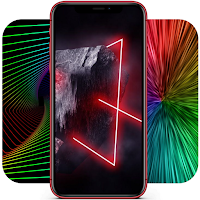
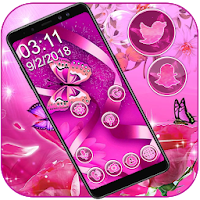
City Neon Light Live Wallpaper & Launcher Themes is a free Neon lighting wallpapers app offer colorful neon light wallpapers, shiny neon icon packs for you to choose. If you love Neon lighting with glittering background, then you can’t miss this shiny City Neon Light Live Wallpaper Themes.
Features of the shiny City Neon Light Live Wallpaper & Launcher Themes
Collection of Live Wallpapers
* 10+ colorful neon light wallpapers give more choices to personalize your screen.
* With fabulous visual effect & cool stunning video effects.
* The colorful neon light Live Wallpapers will be sleep and not drain your battery when your phone turn off.
* Touch or swipe your screen, gesture effect will make the glowing City Neon Light look more fabulous and lively.
Static HD Wallpapers
* Supreme hd wallpapers prepared for those who prefer static Neon lighting wallpapers.
* The colorful neon light wallpaper can be applied as home screen or lock screen, or both at the same time.
* Support to cut, trim, or crop the Neon lighting wallpaper to match your special screen.
* You can blur the Neon lighting wallpapers to create your own stylish background.
Delicate Icon Packs
* A dozen of shiny neon icon packs prepared for those who want to customize the default icons.
* Your screen will be uniformed and stylish with the shiny neon icon packs.
Customized Neon lighting Launcher Themes
* After apply the glowing City Neon Light theme, your home screen will be a brand new one with stylish shiny neon icon packs.
* Smart folder automatically organizes your apps based on functions
* One tap booster will allow you free up more memory for your phone.
* With search bar widget, you can easily and rapidly get the apps you want.
Note:
If you just want to use hd wallpaper or live wallpaper, don’t want to change your default screen, please just apply the wallpaper or live wallpaper.
If you want to make your whole screen customized with stylish shiny neon icon packs, then keep applying theme after the wallpaper applied. After apply the glowing City Neon Light theme, your whole default screen will be change to a customized stylish one.
How to use the shiny City Neon Light Live Wallpaper Themes
1.Open the beautiful neon skull Live Wallpaper App
2.Choose your favorite Neon lighting wallpaper in the wallpaper list
3.The static glowing City Neon Light hd wallpaper offered trim, cut, blur function, and can be applied as home screen, lock screen, choose you as you like.
4.Click apply, the shiny City Neon Light Live wallpaper can be applied directly. Congratulations, the neon skull live wallpaper applied successfully.
5.If you want to customize your icons, then keep to click the “APPLY THEME” button, you will get a stylish and fabulous screen with shiny neon icon packs.
If you like the shiny City Neon Light Live Wallpaper, please leave a comment, your suggestion will be a inspiration for us to create more wonderful live wallpapers and themes. Thank you very much.