Polkadot Vault (ex. Parity Signer) turns your Android device into a cold-storage wallet for Polkadot, Kusama and other Substrate-based networks and parachains.
This application must be used on a dedicated device that has been restored to factory settings and put into airplane mode after installation.
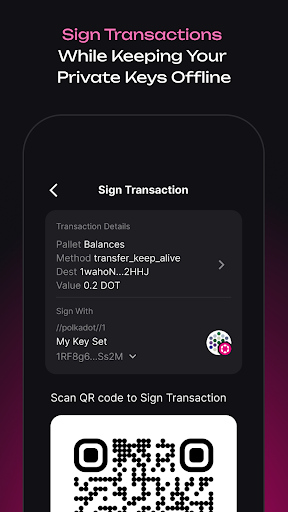
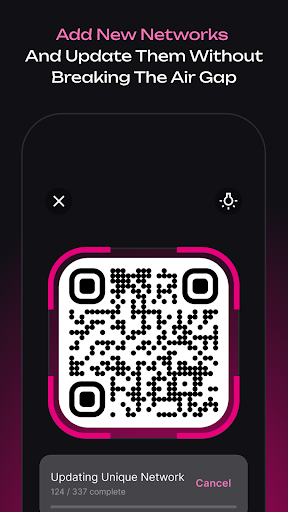
This is the only way to guarantee Air Gap and keep your private keys offline at all times. Signing transactions and adding new networks is then possible using QR codes through the camera without breaking the Air Gap.
Key features:
- Generate and store multiple private keys for Polkadot, Kusama and parachains.
- Create key derivations to have multiple accounts with a single seed phrase.
- Parse and verify your transaction content right on your device before signing.
- Sign transactions directly on your device and execute them on your "hot device" by showing it back the signed QR code.
- Add new networks / parachains and update their metadata in an air-gapped environment using only your camera and QR codes.
- Backup and restore your seed phrases on paper or use Banana Split for maximum security.
– How do I keep my keys secure?
Using Signer is a great way to keep your keys secure! However, that alone won't be enough. Your Signer device can break or get lost. That's why we always recommend having backups, especially paper backups. We are such big fans of paper backups that we even support a special protocol for them called banana-split.
– Should I use Signer?
Signer is optimised for the highest security requirements. If you manage several accounts on several networks, Signer is great for you. If you have little experience with cryptocurrencies but still want good security affordances, you might find the learning curve steep. We strive to make Signer as intuitive as possible; get in touch if you can help us get there!
– How does an offline device communicate with the outside world?
Communication between offline device and the outside world happens through QR codes that are scanned and then, in turn, generated for scanning. There are tried and true cryptographic algorithms that power these QR codes, as well as some smart engineering that make your dedicated device safe to use.