"ScheduleFlag" - Simple schedule management without ads
[Features of the app]
Freely set notifications such as daily, weekly, every few days, specific days, etc.
Prevent forgetting with the check function! A notification will sound when the set time has passed
Also supports tasks that do not require notifications! It can also be used as a memo function to simply write down your schedule.
Ideal for avoiding forgetting to take medications, managing housework, work, and daily tasks
Stress-free and easy to use with no ads
[Useful in these scenes]
Open "ScheduleFlag" every morning to check the day's schedule
Preventing forgetting to take medicine (management of medicines taken in the morning, afternoon, and evening)
Housework routine management and garbage reminders
Can also be used as a simple memo to write down your schedule
[How to operate]
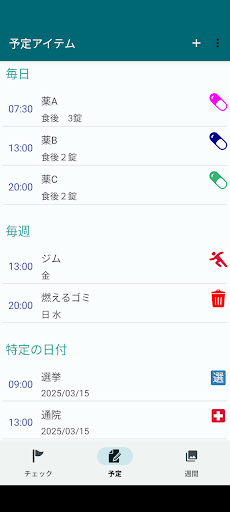
■Schedule screen
This is the screen for registering, updating, and deleting schedules.
Tap the "+" button at the top of the schedule screen to add a schedule item.
Enter the details on the schedule registration screen and turn on "Check target" to be notified.
■Check screen
This is the screen where you can check your daily schedule.
When the schedule is finished, tap the check to display the flag. If you tap by mistake, you can cancel by long-pressing.
If you haven't checked it after the scheduled time, you will receive a notification
You can enter a comment by long-pressing the schedule content.
■Weekly screen
This screen allows you to check the list of schedules on a weekly basis.
It will be displayed as an icon, so please set an easy-to-understand icon when registering your schedule.
Easily manage your daily schedule without ads. Get a simple life with "ScheduleFlag"!