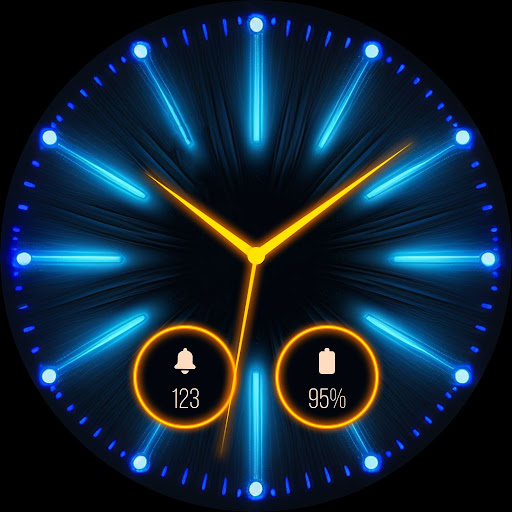
Bring a vibrant, modern look to your Wear OS smartwatch and Android phone with Neon Glow Watch Faces PRO. Personalize your device with glowing neon watchfaces, always-on-display (AOD) options, neon wallpapers, and widgets.
With bright neon colors and glowing designs, these watchfaces and wallpapers are perfect for anyone who loves a unique, eye-catching style. This neon wallpaper and watchface app gives you ready-made neon watch faces and wallpaper themes to match your mood.
You can set the same theme wallpaper for phone and watch face for Wear OS, to give a matching look. This will give your Wear OS watch and phone a unique look.
Highlighted Features of Neon Glow Watch Faces PRO App:
Watch End:
• Neon Analog and Digital Dials
• Customizable Complications
• AOD Support
• Supports Wear OS 4 and Wear OS 5 devices.
Mobile End:
• Neon Analog and Digital Wallpapers
• Theme set as Wallpaper, AOD, or Widget
• Attractive border options for the clock
• For the AOD theme, you can enable or disable the background
Wear OS Supported Devices:
This neon led watchface app is compatible with devices (API Level 33 & above) that support Google's Watch Face Format.
- Samsung Galaxy Watch 4/4 Classic
- Samsung Galaxy Watch 5/5 Pro
- Samsung Galaxy Watch 6/6 Classic
- Samsung Galaxy Watch 7/7 Ultra
- Google Pixel Watch 3
- Fossil Gen 6 Wellness Edition
- Mobvoi TicWatch Pro 5 and newer models
Complications:
You can select and apply the following complications to your Wear OS smartwatch screen:
- Date
- Day of the week
- Day and date
- Next event
- Time
- Step count
- Sunrise and sunset
- Watch battery
- World clock
Steps to Customize Watch Face & Set Complications:
Step 1 -> Touch and hold the display.
Step 2 -> Tap on the "Customize" option to personalize the watchface (dial, color, or complication).
Step 3 -> In the complication fields, select the preferred data to view on the display.
How to Download "Neon Glow Watch Faces PRO" on a Wear OS watch:
1. Install via Companion App (Mobile App)
• Open the companion app on your phone and tap "SYNC ON WEAR OS" on your watch.
• If you don’t see a prompt on your watch, try toggling Bluetooth/Wi-Fi off and on again to resolve the issue.
2. Download From the Wear OS Play Store
• Open the Play Store on your Wear OS smartwatch
• In the search section, search for "Neon Glow Watch Faces PRO" on a Wear OS device and start download.
Bring your smartwatch and phone to life with glowing neon themes. Make every glance at your device exciting, colorful, and unique.