Built to enable organizations streamline operations and stay compliant, the Worklinq app provides employees and managers quick and secure access to the Worklinq solution on their mobile phones.
With the app, employees can among many things:
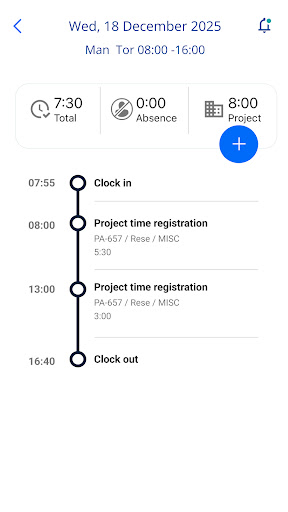
• Clock in/out and register breaks
• Register all types of absences
• Apply for holiday and other leave
• See balances on holiday, flexitime and overtime
• View transaction reports
• Register time spent on projects or job activities
• View own work schedule
• Specify availability (part-time employees)
• Swap, sell or apply for vacant shifts
• Receive push messages about missing registrations, approved/rejected days off, available shifts etc.
• Switch language
• Change password/pin code
Managers have all the same features as the employees. On top of that, they can also among other things:
• Get an attendance overview for their team members
• Approve registrations, requests for leave and shift swaps
• Receive push messages regarding e.g. approval of registrations and absence
• See employee contact details and celebrations events
Please note:
Use of this app requires that your employer has a Worklinq subscription with support for mobile devices enabled and that your employer runs version 6.01.00 or later of Worklinq.
Contact your employer about account details and access issues.