The app is designed to store (edited, deleted, renamed) many samples of random variables, to calculate their basic statistical characteristics as the: -average value; - standard deviation; - skewness and kurtosis; - to calculate confidence intervals of the average value; - variance and standard deviation; - check whether the sample is from normal or uniformly distributed random variable using criterion of Pearson; - check whether the sample is from normal, uniformly and exponentially distributed random variable using criterion of Kolmogorov-Smirnov; - and zero skewness and kurtosis; - determined histogram of sample; - function testing of hypotheses related to the mean and standard deviation; and other.
The application has more functions like:
for generating samples with independent and identically distributed random variables of type: exponential; uniform; Erlang; Weibull, regular and truncated normal.
for smooth distributions, this includes assets for visualization adjusted( smooth) distributions related to the sample, not excluded from the Pearson's and Kolmogorov-Smirnovr's criteria.
In the application, samples of random variables can be stored in a database. The startup screen of the application (AppRenewalProbabilityProcesses) displays a list of samples and buttons for enabling the functions to create (New sample), edit (Edit), calculate (Calculate), and delete (Delete) samples of random variables. From the main screen, via the menu elements, you can also access functions such as language selection, activity of probability distributions, saving and copying the database, initializing the database with sample data, and auxiliary functions such as help for the application, settings, and a link to the website with a description of all applications by the authors.
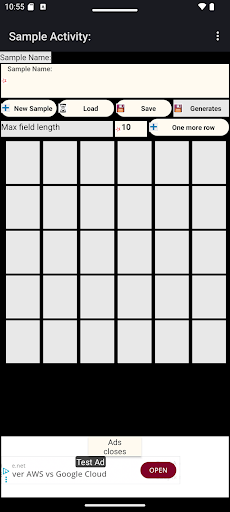
The functions for creating (New sample) and editing (Edit) include the Sample Activity for entering a new sample, editing a selected sample, saving, and generating a sample. The Generate button includes the FlowActivity for generating a sample with one of the following distribution functions: Exponential, Uniform, Erlang, Weibull,, Regular Truncated Normal.
The function for calculating the statistical characteristics of the sample (Calculate) includes the Charact-cs activity, where the following are specified: the number of intervals for calculating the histogram; - the number of decimal places to round the results to; - the significance level for testing conformity with theoretical probability distributions; and - the time up to which the intervals of the recovery probability process are summed. The calculation is performed using the button (red dot) on the toolbar.
The check menu item from the Charact-cs activity includes: - testing hypotheses for the mean value and standard deviation, assuming normal distribution (HypothesesActivity); - creating a histogram (Histogram activity) in graphical and tabular form; - smoothing a probability distribution (SmoothActivity); - probability distributions (Distributions).
The TimeSeries menu item from the Charact-cs activity includes: - graphical and tabular presentation of the sample of the random variable; and forecasts: autocorrelation of the sample of the random variable with the revelation of cyclicality in the values; - and forecasts using the following methods: simple exponential smoothing; - simple moving average; - linear exponential smoothing; - Holt's linear exponential smoothing; - additive damped trend.
In almost all activities of the application, there is a menu item called Save data for print. It pertains to the tabular data presented in the respective activity and is used for formatting the data into a text file and saving it to a chosen directory on the device. The directories on the device are presented in a tree view. The tree structure includes some explorer-like functions, such as expanding, collapsing, and deletion. When a folder is selected, a green save button appears.