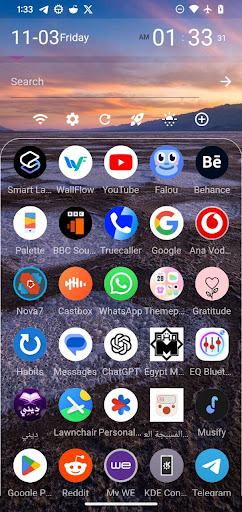
Transparent look that adapts to any wallpaper
Our launcher app has a transparent look that adapts to any wallpaper you choose. This means that your home screen will always look clean and organized, no matter what wallpaper you are using.
Easy calling
Our launcher app makes it very easy to call someone. Simply long-press on the contact's icon on the home screen and select "Call". You can also add a contact to the dock for even easier access.
Scrollable dock
Our launcher app has a scrollable dock that can hold as many apps as you want. This means that you can have all of your favorite apps at your fingertips, without having to clutter up your home screen.
Easy app adding
Our launcher app makes it very easy to add apps to the home screen. Simply drag and drop an app from the app drawer to the home screen. You can also create app folders to group similar apps together.
Web app shortcuts
Our launcher app supports web app shortcuts for any page online. This means that you can add shortcuts to your favorite websites directly to your home screen. To create a web app shortcut, simply open the website in Chrome and tap the three dots in the top right corner. Then, tap "Add to home screen".