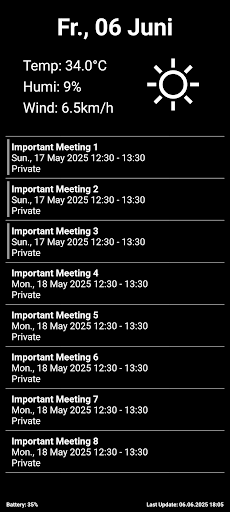
This simple app periodically updates the screensaver of your boox device with the current weather data as well as your next calendar events.
How to configure the screensaver:
------------
(1) Set "App Optimization / Other / Stay Active"
(2) Disable "Android Settings / Apps / Freeze"
(3) Add the home-screen widget
(4) Set the screensaver
Why is it so complicated?
------------
Boox is quite optimized for a long battery life which is great. Nevertheless, this app needs to update the image periodically (which should not require too much battery). To ensure periodic image updates we need (1) & (2) and to ensure an update directly after reboot we need (3).
Altough this app updates the screensaver every n minutes, your boox device will show the newest update only once its locked again. Otherwise it keeps the last screensaver until you unlock / lock it again. If you find any settings to change this behaviour, let me know ;)
Disclaimer
------------
Please be aware that "Screensaver for Boox" is offered as a personal project, and while I put my best effort into its development and maintenance, I cannot provide any warranties regarding its functionality, reliability, or suitability for your specific needs. I do my utmost to ensure it works well, but its performance may vary, and I cannot be held responsible for any issues that may arise from its use.