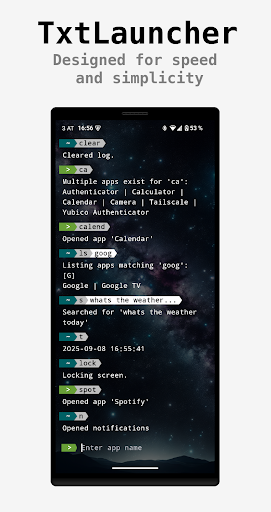
TxtLauncher is a minimalist, text-based launcher designed for speed and simplicity. It’s for those who prefer to type rather than tap.
Think of it as a bash-like experience for your phone, stripped down to the essentials. Instead of navigating through screens of icons and widgets, you just type the name of an app and it launches instantly.
# What TxtLauncher is not
A replacement for a full-featured command-line interface like the bash or similar. Its also not a traditional Android launcher with widgets and customizable icons. It’s a tool built for one purpose: To get you into your apps as fast as possible.
# How it works
App mode: To open an app, just type its name. The app will launch instantly. If the input is not unique you need to adjust (press , to go back in cmd history).
Command mode: Start your query with a period (.) to access special commands. You can quickly list all your apps (.ls), lock your screen (-lock), display the current time, and more.
For a full list of available commands and tips, just type '.?'.
# Accessibility Service
If you want to use the optional lock cmd feature, the accessibility settings are required. No data is collected at all. This permission is only needed to lock the screen. You can disable it at any time once its enabled.