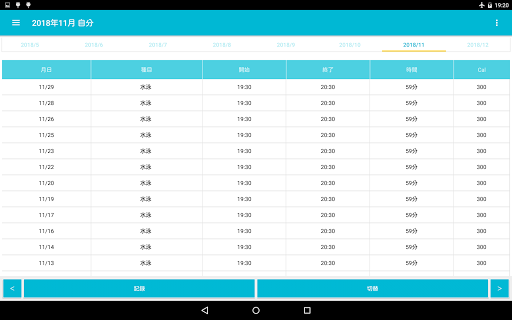
It is an application for recording muscle training and aerobic exercise.
When you start the app, the muscle training record table will be displayed.
Calendar on the left sidebar, graph (weight) of each muscle training item
There is a menu to display.
▼ Procedure for recording weight training
1. 1. Tap the record button and select weight training
2. Select a date and tap Next
3. 3. Select the time and tap Next
4. Enter the event and tap OK
5. Enter the weight, number of times, number of sets and tap OK
6. Select the degree of driving and tap OK
7. Tap Done on the confirmation screen.
▼ Procedure for recording self-weight training
1. 1. Tap the record button and select your own weight training
2. Select a date and tap Next
3. 3. Select the time and tap Next
4. Enter the event and tap OK
5. Enter the number of seconds or number of times, the number of sets and tap OK
6. Select the degree of driving and tap OK
7. Tap Done on the confirmation screen.
▼ Procedure for recording aerobic exercise
1. 1. Tap the switch button.
2. Aerobic exercise Tap daily
3. 3. Tap the record button at the bottom
4. Select a date and tap Next
5. Enter the aerobic exercise item name and tap OK
By selecting from the past history from [Select from history]
You can save the trouble of inputting.
6. Select a start time and tap Done
7. Tap [Done] on the confirmation screen
8. Tap the record in the end column of the table
9. Select the end time and tap OK
→ Automatically entered in the time field
10. Tap the record in the calorie column.
11. Enter the calories burned and tap OK.
▼ About aerobic exercise settings
You can set the time of aerobic exercise from "Aerobic exercise setting" in the menu.
When ON, it is displayed as "hour and minute" (example) 1 hour and 10 minutes
When OFF, display in "minutes" (Example) 70 minutes
▼ How to fix
Tap each item in the table to open the correction screen.
▼ Sort
Tap the month and day in the table to display the ascending / descending selection screen.
You can sort.
▼ About the switching button
Press the switch button to display the following items.
Tap to switch screens.
・ Muscle training every year
・ Muscle training every month
・ Muscle training every day
・ Aerobic exercise every year
・ Aerobic exercise every month
・ Aerobic exercise every day
▼ Annual calendar and graph
Tap the [Annual Calendar and Graphs] menu on the left sidebar
-Displays a horizontal bar graph (average weight / maximum weight / minimum weight) and line graph (maximum weight) for each muscle training item on a monthly basis for one year.
・ Displays the muscle training calendar for each month of the year.
▼ Model change data transfer
Tap "Model change data transfer" in the menu to display the following selection screen.
-Create file (create backup file for model change)
-Restore (Restore data from backup file)
Step A. Steps to create a backup file
1. Tap "Model change data transfer" in the menu.
2. Tap Create File.
3. Tap "Create File" on the confirmation screen.
4. Tap "Select App" on the send screen.
5. Tap "Save to Drive".
* Internet connection is required to save to the drive.
Step B. Restore (Restore data from backup file in step A)
1. Install this app on your new smartphone / tablet from google play. Launch the app.
2. Tap "Model change data transfer" in the menu.
3. Tap Restore.
4. Tap the drive.
5. Tap My Drive.
6. From the list of files, tap the file you want to restore.
If you tap "Sort" from the menu on the upper right, you can sort by "Modified date (newest first)".
■ If the app does not open after changing models
Try steps 1-5 below on your new smartphone / tablet.
Step 1. Press and hold / long tap the app icon.
Step 2. Tap the app information.
Step 3. Tap "Storage and cache".
Step 4. Tap "Erase Storage".
Step 5. Start the application and restore from "Model change data transfer"-> Restore-> File selection.